Small Business Networking: The Complete Guide (2026)
A reliable computer network is the foundation of almost every modern business. Whether you’re running a small office with five employees or managing a growing company with dozens of workstations, your network connects the devices, applications, and people that keep your business running.
But building a small-business network doesn’t have to involve expensive enterprise equipment or unnecessarily complicated configurations.
The key is understanding what your business actually needs and designing a network that is secure, reliable, and easy to maintain.
In this comprehensive guide, we’ll cover everything from basic networking concepts and essential hardware to Wi-Fi planning, network security, remote access, and troubleshooting.
By the end, you’ll understand how to plan and manage a practical small-business network.
1. Understanding Small Business Networking
A computer network allows devices to communicate and share resources.
In a typical small office, these resources might include:
- Internet connectivity
- Shared files and folders
- Network printers
- Business applications
- Cloud services
- Internal servers
- VoIP telephone systems
- Wireless access for employees and guests
Most small offices use a Local Area Network (LAN), which connects devices within a limited physical location.
The office LAN connects to the internet through a router or firewall.
LAN vs. WAN
A LAN (Local Area Network) connects devices within your office, building, or another limited area.
A WAN (Wide Area Network) connects networks across larger geographical distances.
The internet is the most familiar example of a WAN.
For most small businesses, the priority is building a reliable LAN with a secure connection to the internet.
Wired and Wireless Networks
A wired network typically uses Ethernet cables to connect computers, servers, switches, and other equipment.
A wireless network uses Wi-Fi to connect devices without physical network cables.
Most businesses benefit from combining both technologies.
For a more detailed introduction, read our guide to small-business network basics.
2. Essential Networking Equipment
Before designing your network, it’s important to understand the purpose of each device.
Modem or Optical Network Terminal
Your internet service provider may supply a modem, an optical network terminal (ONT), or a combined gateway.
This equipment connects your premises to the provider’s network.
Depending on your internet service, it may also include routing, Wi-Fi, and firewall functionality.
Router
A router connects different IP networks and forwards traffic between them.
In a small office, the router typically connects the internal network to the internet.
It may also provide:
- DHCP services
- Network Address Translation (NAT)
- Basic firewall functionality
- VPN capabilities
- VLAN routing
- Traffic management
Choosing the right router depends on the number of devices, internet speed, security requirements, and expected network growth.
Read our guide on choosing a router for a small business.
Network Switch
A network switch connects wired devices within the same local network.
For example, a 24-port switch can connect office computers, printers, servers, and wireless access points.
There are two main categories:
Unmanaged switches generally work without manual configuration and are suitable for simple networks.
Managed switches provide additional capabilities such as VLAN configuration, traffic monitoring, and network management.
For a detailed comparison, see our article on managed vs. unmanaged switches.
Wireless Access Point
A wireless access point provides Wi-Fi connectivity to devices on your wired network.
Although many routers include built-in Wi-Fi, dedicated access points can provide better coverage and management options in larger offices.
Multiple access points may be necessary when your office has several rooms, thick walls, or multiple floors.
Learn more in our router vs. access point comparison.
Network Firewall
A firewall controls network traffic according to defined security rules.
Most routers include basic firewall capabilities, but businesses with multiple networks, servers, or advanced security requirements may benefit from dedicated firewall solutions.
We’ll explore network security in more detail later in this guide.
3. Planning Your Small Office Network
Good network design starts with understanding your business requirements.
Before purchasing equipment, answer a few questions:
- How many employees will use the network?
- How many computers, printers, and other devices will be connected?
- Will employees need Wi-Fi, wired Ethernet, or both?
- Are there internal servers or shared storage devices?
- Will guests require internet access?
- Do employees need remote access?
- Is the business planning to expand?
Consider future growth rather than designing only for your current number of devices.
Example: A Small Office with 10 Employees
Imagine a company with:
- 10 desktop computers
- 2 network printers
- 1 file server or NAS
- 3 wireless access points
- 1 business router/firewall
- 1 managed network switch
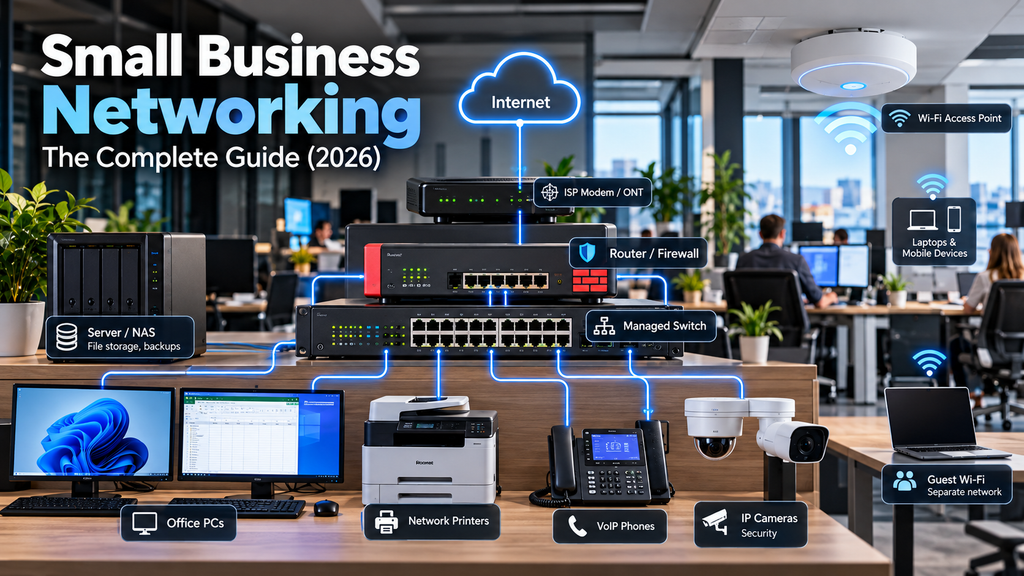
A practical network topology might look like this:
Internet → ISP Modem/ONT → Router/Firewall → Managed Switch
From the switch, Ethernet connections lead to computers, servers, printers, and wireless access points.
This design provides centralized connectivity and makes future expansion easier.
If you want a practical walkthrough, read our step-by-step small-office network setup guide.
4. Understanding IP Addresses, DHCP, and DNS
Three important networking concepts are IP addressing, DHCP, and DNS.
IP Addresses
Every device communicating over an IP network needs an appropriate IP address.
An example private IPv4 address is:
192.168.10.25
In a typical office, devices use private IP addresses to communicate internally.
The router usually provides connectivity to external networks.
DHCP
Dynamic Host Configuration Protocol (DHCP) automatically assigns network configuration information to devices.
This commonly includes:
- IP address
- Subnet mask
- Default gateway
- DNS server addresses
DHCP reduces manual configuration and helps prevent addressing mistakes.
For ordinary employee computers, DHCP is usually the easiest option.
Servers, printers, and infrastructure devices may use static addresses or DHCP reservations to maintain predictable network identities.
DNS
Domain Name System (DNS) translates domain names into information such as IP addresses.
For example, DNS allows a computer to resolve a website’s domain name without requiring the user to remember its numerical address.
In business networks, DNS may also support internal services and Active Directory environments.
Incorrect DNS settings can cause problems that appear to be general internet connectivity failures.
5. Wired vs. Wireless Networking
Both Ethernet and Wi-Fi have important roles in business environments.
Advantages of Ethernet
Wired connections generally offer:
- Consistent performance
- Low latency
- Reduced susceptibility to radio interference
- Reliable connectivity for stationary equipment
Servers, desktop computers, network storage, and other important infrastructure often benefit from Ethernet.
Advantages of Wi-Fi
Wireless connectivity provides mobility and convenience.
It is particularly useful for:
- Laptops
- Smartphones
- Tablets
- Meeting rooms
- Guest devices
- Flexible workspaces
However, Wi-Fi performance depends on access point placement, signal quality, interference, channel planning, and client density.
Improving Office Wi-Fi
To improve wireless reliability:
- Position access points carefully.
- Avoid unnecessary overlapping coverage and channel interference.
- Use modern wireless security such as WPA2-AES or WPA3 where supported.
- Keep access point firmware updated.
- Separate guest access from internal business resources.
- Monitor wireless performance and client connectivity.
If your wireless network frequently disconnects, our article on why office Wi-Fi keeps dropping covers common causes and troubleshooting steps.
6. Network Segmentation and VLANs
As a business grows, placing every device on one unrestricted network becomes less desirable.
Network segmentation allows administrators to separate different categories of devices.
One common approach is using Virtual Local Area Networks (VLANs).
What Is a VLAN?
A VLAN creates a logical separation between groups of devices, even when they share the same physical switching infrastructure.
For example, an office could use:
| VLAN | Network | Purpose |
|---|---|---|
| 10 | 192.168.10.0/24 | Employee computers |
| 20 | 192.168.20.0/24 | Servers |
| 30 | 192.168.30.0/24 | Guest Wi-Fi |
| 40 | 192.168.40.0/24 | Network management |
VLANs provide logical separation, but security between VLANs depends on properly configured routing and firewall policies.
Why Use VLANs?
Segmentation can help:
- Restrict guest access to business resources
- Isolate less-trusted devices
- Organize network management
- Limit unnecessary communication
- Reduce the impact of certain security incidents
For a deeper explanation, see our guide to VLANs for small businesses.
7. Securing Your Small Business Network
Network security should be part of the initial design, not something added after deployment.
A secure small-business network combines several protective measures.
Firewall Protection
A properly configured firewall controls traffic between networks and limits unnecessary exposure.
Recommended practices include:
- Blocking unsolicited inbound connections
- Restricting access to administrative interfaces
- Allowing only necessary traffic between network segments
- Keeping firewall software updated
- Reviewing important security logs
Read our complete small-business firewall setup guide.
Strong Authentication
Use unique user accounts and strong passwords.
Enable multi-factor authentication wherever supported, especially for administrative accounts, cloud services, and remote access.
Avoid sharing administrator credentials among employees.
Device Security
Protect computers and servers with:
- Supported operating systems
- Regular security updates
- Endpoint protection
- Device encryption where appropriate
- Limited administrative privileges
Network security is most effective when individual devices are also properly secured.
Backups
A firewall cannot prevent every security incident or hardware failure.
Maintain reliable backups of important business data and regularly test restoration procedures.
Consider keeping at least one backup copy offline or otherwise isolated from production systems.
8. Secure Remote Access for Employees
Many small businesses need employees to access office resources from home or while traveling.
Common requirements include:
- Accessing shared files
- Using internal business applications
- Connecting to office computers
- Performing remote IT administration
Remote access must be configured carefully to avoid exposing internal systems.
VPN Connections
A Virtual Private Network (VPN) provides encrypted connectivity between remote devices and approved network resources.
Solutions such as WireGuard and IPsec can be suitable for small-business deployments.
Remote Desktop
Windows Remote Desktop Protocol (RDP) allows users to control remote Windows computers.
However, directly exposing RDP to the public internet creates unnecessary security risks.
Use a properly secured VPN, Remote Desktop Gateway, or suitable identity-aware access solution instead.
Our article on secure remote access for small businesses explains these approaches in more detail.
9. Common Small Business Network Problems
Even a well-designed network occasionally experiences connectivity issues.
The most effective troubleshooting process starts by identifying the scope of the problem.
Problem: No Internet Connection
Check whether the issue affects one device or the entire office.
If every device is affected:
- Verify the ISP connection.
- Check the router or firewall status.
- Inspect WAN interface settings.
- Test connectivity to the ISP gateway where applicable.
- Check DNS resolution.
If only one computer is affected, investigate its local network connection and configuration.
Problem: Slow Network Performance
Possible causes include:
- Network congestion
- Faulty Ethernet cables
- Wireless interference
- Overloaded network devices
- Incorrect link negotiation
- Slow internet service
Use appropriate network monitoring and testing tools to identify the bottleneck.
Problem: Devices Cannot Access Shared Resources
Check:
- IP addressing and subnet configuration
- DNS resolution
- Windows Firewall settings
- File-sharing permissions
- VLAN routing and firewall policies
- Server availability
Avoid disabling security controls permanently just to restore connectivity.
Instead, identify and correct the specific configuration problem.
10. Network Monitoring and Maintenance
A network requires ongoing maintenance to remain reliable and secure.
For small businesses, establish a simple routine.
Weekly Checks
Review critical alerts, connectivity problems, and backup status.
Monthly Checks
Review software updates, network device health, and recurring performance problems.
Quarterly Checks
Review firewall rules, user access, network documentation, and equipment capacity.
Keep Network Documentation
Document essential information such as:
- Network topology
- IP address ranges
- VLAN assignments
- Device inventory
- Firewall and VPN configuration
- Administrative access procedures
- Backup and recovery information
Store sensitive documentation securely and restrict access to authorized personnel.
Good documentation makes troubleshooting easier and reduces dependence on a single administrator.
11. Common Network Design Mistakes
Several avoidable mistakes can create long-term problems.
Buying Equipment Without Planning
Purchasing network devices before defining requirements may lead to compatibility issues or unnecessary expenses.
Using Consumer Equipment Beyond Its Capabilities
Consumer routers can work well in very small environments, but may become limiting when advanced security, segmentation, or management features are required.
Ignoring Network Segmentation
A flat network can allow unnecessary communication between devices and increase the impact of certain security incidents.
Poor Wi-Fi Placement
Installing a single access point in an unsuitable location can cause weak coverage and unstable connectivity.
No Documentation
Undocumented networks become difficult to maintain, especially when administrators change.
No Backup Internet Connection
Businesses that depend heavily on cloud applications or VoIP may benefit from a secondary internet connection.
The need depends on how much downtime the business can tolerate.
12. How Much Does a Small Business Network Cost?
The cost of a small-business network depends on several factors:
- Number of employees and devices
- Required internet speed
- Router and firewall capabilities
- Number and type of switches
- Wi-Fi coverage requirements
- Structured cabling
- Servers and storage
- Installation and maintenance
A very small office may operate effectively with a capable router, one switch, and a wireless access point.
A larger office may require managed switches, multiple access points, network segmentation, dedicated firewall hardware, and centralized monitoring.
Avoid focusing exclusively on the initial equipment price.
Reliability, security, maintenance requirements, and future expansion also affect the total cost of ownership.
13. Small Business Networking Checklist
Before considering your network ready for production, verify the following:
- The network design meets current business requirements.
- Routers and switches have sufficient capacity.
- Critical devices use reliable wired connections where appropriate.
- Wi-Fi coverage is adequate.
- Guest access is separated from internal resources.
- IP addressing and DHCP are configured correctly.
- Firewall rules follow least-privilege principles.
- Remote access is secured.
- Network devices receive regular updates.
- Important business data is backed up.
- Administrative access is restricted.
- Network documentation is maintained.
Review this checklist whenever your business adds new equipment, employees, or services.
Final Thoughts
Building a reliable small-business network doesn’t require enterprise-level complexity.
What matters most is choosing appropriate equipment, planning the network carefully, applying sensible security controls, and maintaining the infrastructure over time.
Start with the essentials: a reliable internet connection, a capable router or firewall, appropriate switching equipment, and properly planned wired and wireless connectivity.
As your business grows, consider additional capabilities such as VLAN segmentation, centralized monitoring, and more advanced security policies.
Most importantly, treat your network as an essential business system rather than a collection of connected devices.
A well-designed network should be secure, reliable, scalable, and straightforward to manage.
Use the detailed guides linked throughout this article to explore individual topics and build a network that supports your business today and in the future.
8 Comments