Modem vs Router: What’s the Difference (And Do You Really Need Both)?
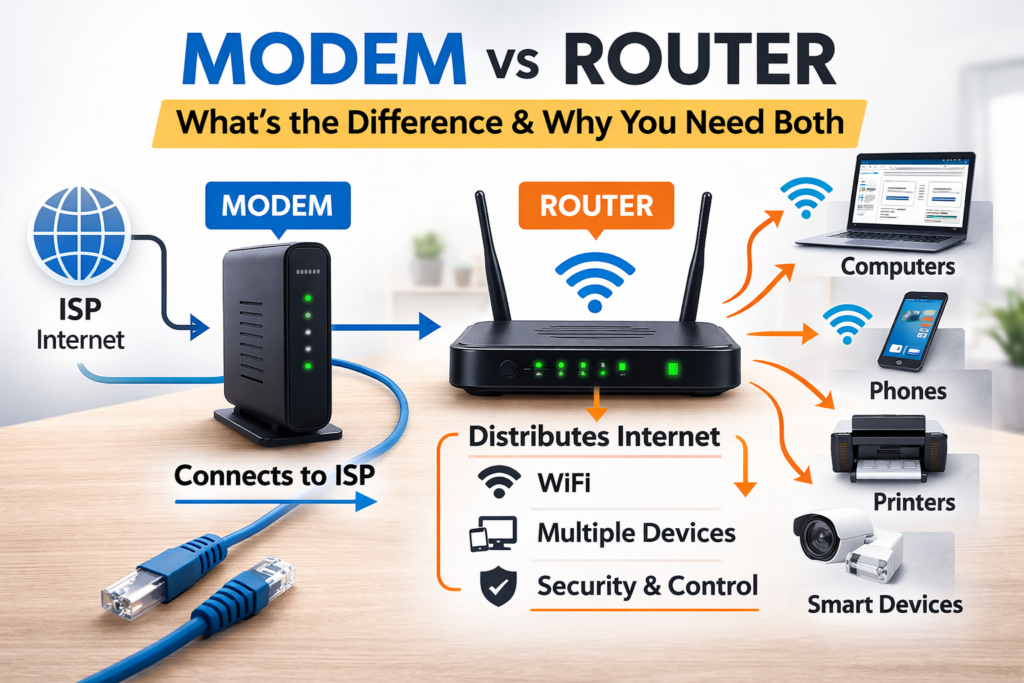
If you run a small office or home business, you’ve probably asked this at some point:
“Do I need a modem? A router? Aren’t they the same thing?”
Short answer:
No — they are not the same.
And yes — in most cases, you need both.
Let’s break it down in plain English — no unnecessary networking jargon.
What Is a Modem?
A modem is the device that connects your building to your Internet Service Provider (ISP).
It’s the translator between:
- Your ISP’s signal (cable, fiber, DSL)
- Your internal network
Think of it as the front door of your internet connection.
Without a modem, you don’t have internet access at all.
What a Modem Actually Does
- Receives internet signal from ISP
- Converts it into usable digital traffic
- Passes it to one device (usually a router)
Important:
A modem does not distribute internet to multiple devices. It usually has just one Ethernet port.
That’s where the router comes in.
What Is a Router?
A router distributes internet inside your home or office.
It:
- Connects multiple devices
- Creates your WiFi network
- Assigns local IP addresses
- Separates your internal network from the outside world
If the modem is the front door, the router is the office manager deciding who gets access and how traffic flows.
Simple Analogy
Think of it like this:
- Modem = water pipe coming into your building
- Router = plumbing system inside your building
Without the pipe, no water.
Without plumbing, water doesn’t reach your sinks.
You need both.
What About “Modem + Router” Devices?
Many ISPs give you a single box that “does everything.”
These are called:
- Gateway devices
- Modem-router combos
- All-in-one routers
They combine both functions into one device.
This works fine for:
- Small apartments
- 1–3 devices
- Light usage (email, browsing, Netflix)
But in business environments?
It often becomes a bottleneck.
Why Small Businesses Should Avoid ISP Combo Devices
As a system admin, you probably already know this — but your readers might not.
Here’s why combo devices are usually not ideal for small offices:
1. Weak WiFi Coverage
ISP devices typically:
- Have weak antennas
- Poor range
- Limited control
Result:
Dead zones and unstable connections.
2. Limited Security Options
Most ISP routers:
- Don’t allow advanced firewall configuration
- Don’t support VLANs
- Have limited logging
For business use, that’s not great.
3. Poor Performance Under Load
When multiple devices connect:
- Video calls
- Cloud backups
- File sync
- Streaming
Cheap combo devices start to struggle.
You’ll see:
- Lag
- Dropped calls
- Slow file uploads
4. No Real Upgrade Path
If your internet speed increases:
- The ISP device may not support higher throughput
- You’re stuck with whatever hardware they give you
Owning your router gives you flexibility.
Recommended Setup for Small Offices
If you’re building a small office setup from scratch, start with our guide on network basics for small businesses to understand the essential components before choosing equipment. Network Basics for Small Businesses: What You Actually Need (Without Overcomplicating It)
For most small businesses (5–20 users), this is ideal:
ISP Modem (Bridge Mode) → Business-Grade Router → Switch → Devices
This setup gives you:
- Better performance
- Stronger security
- Easier troubleshooting
- Upgrade flexibility
And honestly — fewer headaches.
Do You Always Need Both?
Here’s the practical breakdown:
| Scenario | Modem | Router |
| Home apartment | Yes | Yes (or combo device) |
| Small office | Yes | Yes (separate recommended) |
| Fiber with ISP ONT | Often built-in | Still need router |
| Mobile hotspot | Built-in | Built-in |
Important note:
If you have fiber, your ISP may install an ONT (Optical Network Terminal). That replaces the traditional modem — but you still need a router.
What Happens If You Plug Directly Into a Modem?
Technically, you can plug a laptop directly into a modem.
But:
- Only one device can connect
- No WiFi
- No internal network
- No firewall protection (in most cases)
Not recommended for anything serious.
Security: Why the Router Matters More Than You Think
Your router is your first line of defense.
It handles:
- NAT (Network Address Translation)
- Basic firewall rules
- Device isolation
- Port forwarding
A bad router = weak network security.
For business environments, you should at least consider:
- Business-grade router
- Proper firewall configuration
- Separate WiFi for guests
This is where most small offices underestimate risk.
Signs You Need a Better Router
If you notice:
- WiFi drops randomly
- Video calls freeze
- Speed is good on cable but bad on WiFi
- Employees complain constantly
- Rebooting “fixes” things temporarily
It’s usually not your ISP.
It’s your router.
Common Myths
“More antennas means better WiFi”
Not necessarily. Placement and firmware matter more.
“Expensive router = faster internet”
No.
Your internet speed is limited by your ISP plan.
A better router improves:
- Stability
- Internal traffic handling
- Coverage
Not your subscription speed.
“ISP router is good enough”
For Netflix? Yes.
For accounting software, cloud backups, VoIP, and remote access?
Usually not.
Choosing the right network hardware is just as important as selecting the right hosting solution — especially if you’re deciding between shared hosting and VPS for your business website. Shared Hosting vs VPS: What Small Businesses Actually Need
Quick Buyer’s Guide (Without Overcomplicating It)
If you’re choosing equipment for a small office:
Look for:
- Gigabit WAN port
- At least dual-band WiFi
- Decent CPU (yes, routers have CPUs)
- Regular firmware updates
- VLAN support (if you want to grow)
Avoid:
- The cheapest “gaming” router
- Random no-name brands
- Very old hardware
Should You Buy Your Own Modem?
Depends on your ISP.
In many countries:
- ISPs allow you to use your own modem
- Or at least put theirs into bridge mode
Owning your own modem:
- Saves rental fees
- Gives you more control
- Removes ISP remote management risks
But always confirm compatibility first.
Final Verdict
Here’s the simple rule:
- Modem connects you to the internet
- Router connects your devices to each other and to the internet
Most small businesses need both — separately.
If you want:
- Stability
- Security
- Scalability
- Fewer IT emergencies
Don’t rely entirely on ISP combo devices.
Invest once. Save nerves later.